LinkedIn Sales Navigator is one of the most underutilized tools for prospecting, lead generation, and building business relationships. In my opinion, there isn’t a single tool on the market with the level of utility that Sales Navigator provides for the price.
Yet so many people don’t use Sales Navigator to its fullest potential because they don’t know how.
When I think of the benefits of Sales Navigator at face value, I think of two things — targeting and messaging. Today we are going to focus on targeting because this is where every interaction on LinkedIn begins. Knowing how to use the Advanced Search filters in Sales Navigator properly is important for spending your time and interacting with the most ideal prospects possible.
When it comes to the filters on LinkedIn Sales Navigator, I like to focus on a few core filters that get utilized for every one of my searches. Then, I think of the other filters as more of an auxiliary that I can add and remove to be more precise.
The core filters you should be using with every search are Geography, Company, (Job) Title, and Spotlights.
How You Can Use the Core Advanced Filters
[Geography]
Filters don’t get more straightforward than this, but it is worth mentioning because it is such a core component of building a search. A feature that often is overlooked is the ability to filter by a specific Postal Code.
The utility of Postal Code filtering applies to brick & mortar businesses tied to a physical location and/or salespeople who have a specific region. For example, I’ve always thought it would be cool if a Real Estate Agent used the Postal Code filter to connect with the most active LinkedIn members in their community.
[Company]
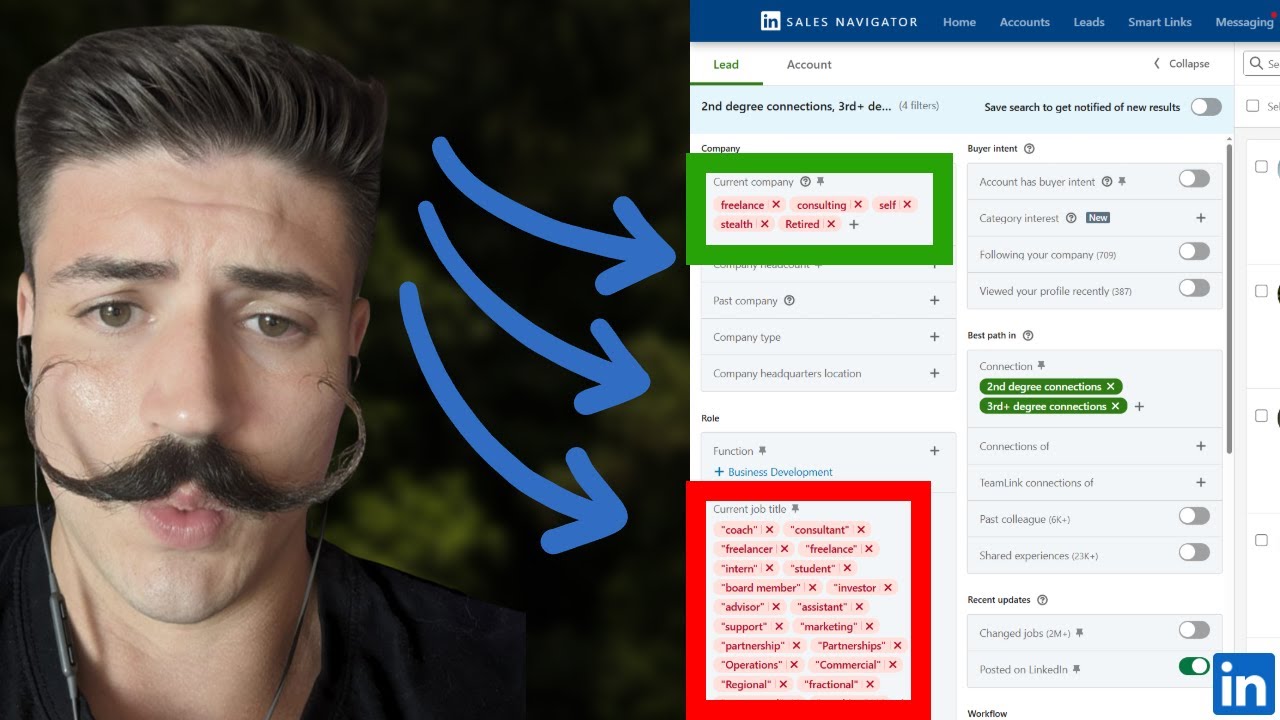
Now, this might throw some people for a loop, but the Company filter has allowed me to get much better results than using the Industry filter. This is for a number of reasons, and without going too into the thick of it, comes down to folks who have multiple positions that are current, but also in different industries.
For this reason, I would recommend getting comfortable with the company filter and trying it yourself. Something to note about the Company filter is that you can utilize Boolean Search, which creates endless possibilities.
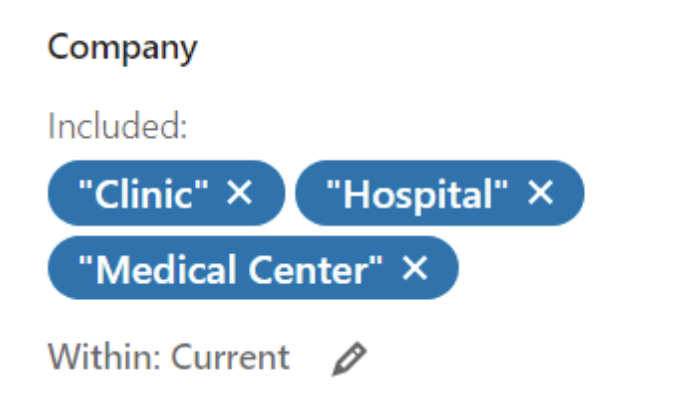
One example of where I’ve found the Company filter to get more precise results than the Industry filter is when targeting Hospitals. Rather than using the Industry filter for this, I prefer to enter Hospital, Medical Center, and Clinic into the Company filter. This way I know the exact companies I am going to populate.
Another example would be targeting tech companies with “.io” or “.ai” in their company name listed on LinkedIn. The possibilities are endless with this, and you can get really creative to get precise search results. This also can work well in conjunction with the Industry filter; although, you may be limiting your search results by using both.
Other examples: If targeting manufacturing companies, think about entering “Manufacturing” into the Company filter. If you are targeting lawyers who have a small practice, think about adding Lawyer into the Title filter, and “Associates” into the Company filter.
The possibilities are truly endless, which makes this such an important and underutilized filter.
[Title]
The Title filter is my “golden” filter so to speak. If I had to pick only one Sales Navigator filter, this is the one I would choose.
There is just so much that can be done with this single filter, so I’ll share a few examples. Again, the Title filter is so powerful because it allows the use of Boolean Search.
For example, if I was searching for Transplant Directors, I could use the search below to search for directors, while also excluding anyone involved in Hair Transplant.

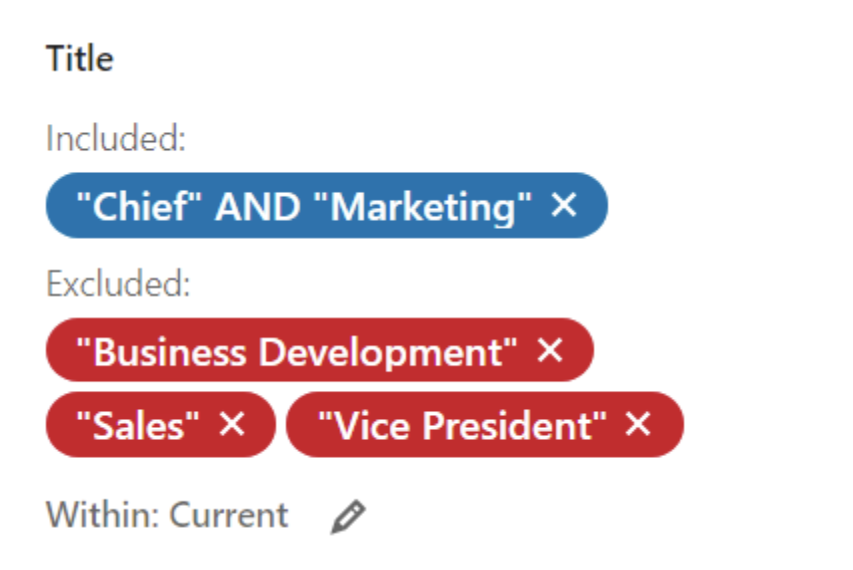
Here is another example: Let’s say I’m wanting to target Chief Marketing Officers, but I don’t want anyone who also does Sales or Business Development. I only want folks whose sole focus is marketing. I might use a search like the screenshot below.
Community Insider Tip: Something that will help you as you refine your Title searches to be exactly what you want is to scroll through a few pages of results.
Look for words in the Titles of some of your prospects, and if you see anything that looks off, go ahead and exclude it from the search.
Many times, I will exclude “coaches”, “consultants”, etc. to make sure that my search results stay as neat as possible.
[Spotlights]
This is an easy filter to add, but an extremely important one if you are trying to find the most active people on LinkedIn. As we all know, not everyone who has a LinkedIn account uses it every day.
In order to make sure that your prospecting work is targeted at folks who are active, I would recommend utilizing the “Posted in the last 30 days” or “Changed jobs in the last 90 days” filters.
As a rule of thumb, I usually focus on the folks who have posted in the last 30 days and add on changed jobs in the last 90 days when needed; however, they both serve their function.
Core Filter Recap
When building out a new search, I would recommend starting off with the four filters above, and then refining your search criteria from there. I would also focus on 2nd and 3rd-degree connections if you’re not looking to reach out to current connections.
When done correctly, the core filter searches can result in some of the best results. For times when you are looking to narrow your search even further, that is when I would recommend adding the auxiliary Advanced Search filters below.
Auxiliary Advanced Filters You Should Leverage
[Past Lead Activity]
Use this to remove leads that you’ve reached out to or have saved to a list. Use this to keep your Saved Searches free of clutter/leads you’ve already worked through.
[Years of Experience]
This is the closest filter we have to be able to target by age. If we want to target younger people, perhaps those with 5 or fewer years of TOTAL experience might be an effective target. If we want older, more experienced people, the 10+ might be the route.
Maybe you want an older target that is new to their position and/or company. This is when you can use the Years filters in tandem.
Example: Someone with 10+ years of work experience, but only 1 or 2 years in an executive position may be a good target because they have some experience but are now in a position to make decisions.
[First Name]
This filter has a lot of utility if you want to target a specific gender. For a suit designer that only wants to target men, you can put hundreds of male names in the First Name filter to find men. Same thing for female executive coaches that work exclusively with women.
[Last Name]
Let’s say you are targeting people with advanced academic degrees or certifications (i.e. PhD, MD, JD, PMP, CPA, CFA, MBA). When creating their LinkedIn profiles, these folks will often place them after their Last name is the Last Name field.
Stick those degrees or certifications that you work with often in there and watch LinkedIn work its magic.
[Industry]
When I first started using LinkedIn Sales Navigator I used the Industry filter all the time. As you may have already experienced, there are some oddities about this filter on LinkedIn that cause it to be less reliable in nature.
It is a good blanket filter when accurate, but it is by no means all-encompassing. A big shortcoming of this filter is that much of it relies on self-reported data.
Most things can be targeted more precisely by using Boolean Search in the Company filter. I will still use the Industry filter when I am trying to narrow down a list that is already extremely large. Or maybe, the words that I chose to put in the Company filter pertain to multiple industries, so I use the Industry filter to make sure that I am only targeting a specific niche.
For example, If I wanted to target a distribution company in Food & Beverages, I would add “Distribution” in the Company filter, and then Food & Beverages in the Industry filter. This is a great auxiliary filter but has many shortcomings to rely on solely for precise targeting.
[Seniority level]
Similar to the Industry filter, I used to use the Seniority level filter all the time. The more I created searches, the more I realized how unreliable it is. Everything that the Seniority level filter does the Title filter does better. The place I will still use Seniority level is if I need to exclude a certain demographic, or if I want an additional layer of filtering because my search is too large, and I have some wiggle room to be less specific in targeting nature.
Are You Ready to Give These Filters a Try?
LinkedIn Sales Navigator is an extremely useful tool but can require a bit of trial and error to get the most precise searches possible. Relying on the fields that allow for Boolean Search will allow you to generate the best results.
It can take a bit of practice when trying to use Sales Navigator Advanced Search filters in a way you may have never done before, but that is what the Sales Navigator Community is all about.
Feel free to connect with me on LinkedIn if you have more questions. I would be happy to work with you to create some amazing search results together!
For more sales advice from experts in the space, subscribe to LinkedIn Sales Blog.