How We Find B2B Leads With LinkedIn Boolean Search
Boolean search is a powerful technique to precisely hunt down B2B leads on LinkedIn. But a surprising number of people have no idea this feature exists. And many who do have no idea how to use it for highly targeted prospecting.
Sounding familiar? Don’t worry.
In this Uptown Creation article, we’ll introduce you to Boolean search and explain how you can use it to locate the right B2B leads without stress.
What Is LinkedIn Boolean Search Anyway?
Boolean searches use logical operators (things like AND, NOT, OR, etc.) to narrow down results and help you find exactly what you’re looking for. This is super helpful on LinkedIn when you’re trying to find very specific B2B prospects that tend to get buried in search results.
Say you want to find software engineers who work in the healthcare industry but aren't in management roles. You could enter a keyword string, but then you’ll need to sort through thousands of results where one or two words match, but not necessarily all of them.
Using Boolean search, a query like this will give you an almost perfectly targeted list of leads:
- ("software engineer" OR "software developer") AND (healthcare OR medical OR hospital) NOT (manager OR director OR lead)
Don’t worry—we’ll explain how this works!
LinkedIn Boolean Search Elements
Keywords or Descriptors
These are the words or phrases that describe your ideal lead.
They fall into categories like:
- Seniority level (manager, director)
- Industry/Field (healthcare, finance, tech)
- Job function (software engineer, marketing manager, SDR)
- Skills (C++, HTML, social media marketing)
- Company (Google, Stripe, Mayo Clinic)
- Location (San Francisco, New York City, remote)
…you get the idea.
You can pull this from your ideal customer profile (ICP). However, as we’ll cover in a bit, you can also use keywords to avoid certain types of leads. So, you should also list out keywords related to red flags and deal breakers.
Quotation Marks (" ")
Using quotation marks in your search treats the enclosed phrase as a single unit. This way, the search only returns profiles where the words appear exactly as entered.
For example, if you search for a sales manager without quotation marks, you’ll get some results for actual sales managers. But you'll also see a lot of profiles with the individual terms "sales" and "manager" (like general managers, sales interns, etc.).

A search with quotation marks (e.g., “sales manager”) helps you avoid this issue.
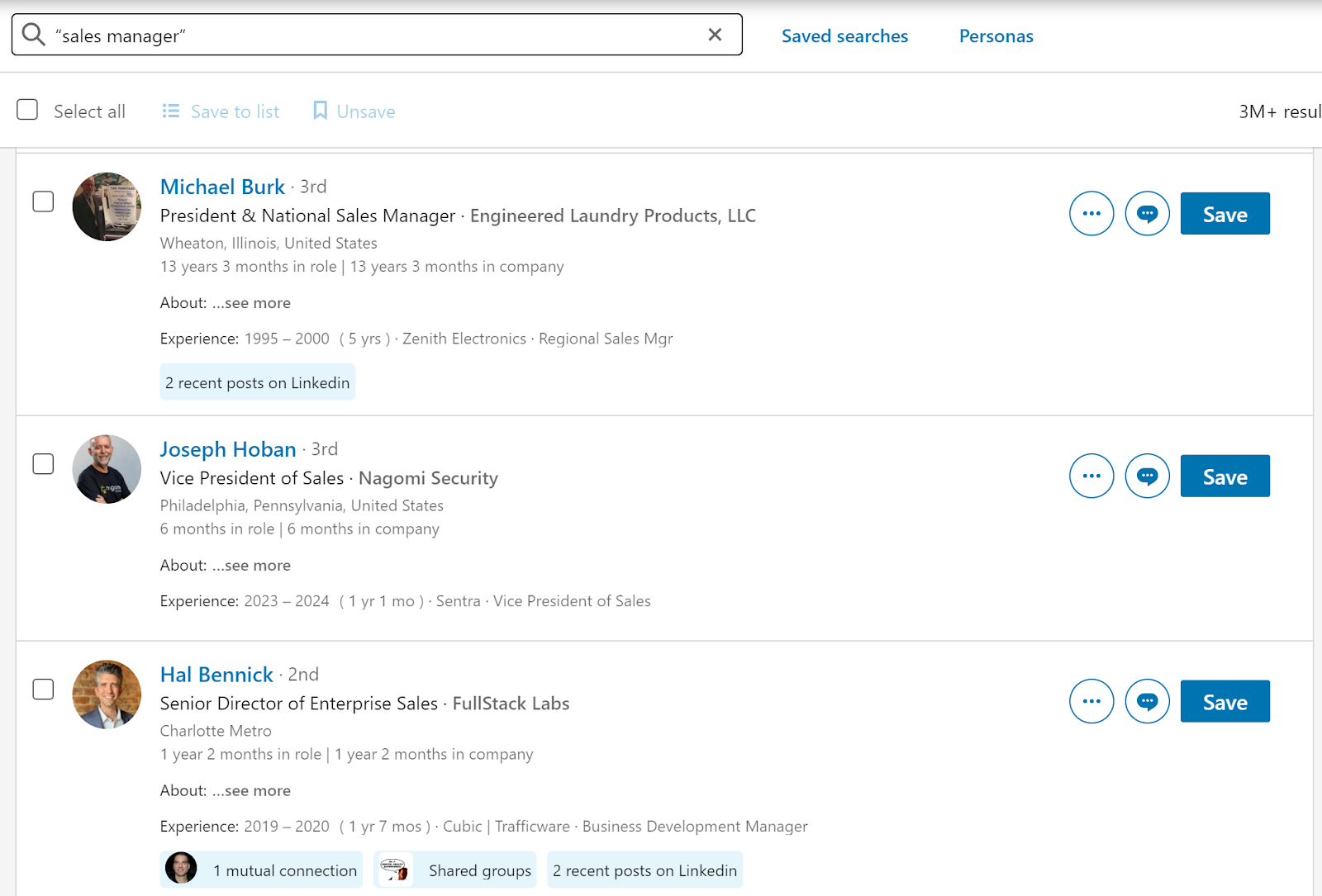
It’s not perfect, but it’s a much cleaner list already.
AND
AND is an operator that you can plant between two keywords to tell LinkedIn that you only want results that include both (rather than one or the other).
For example, "marketing director" AND “SaaS” will fetch you profiles with both "marketing director" in their title or experience and SaaS listed somewhere on their profile.
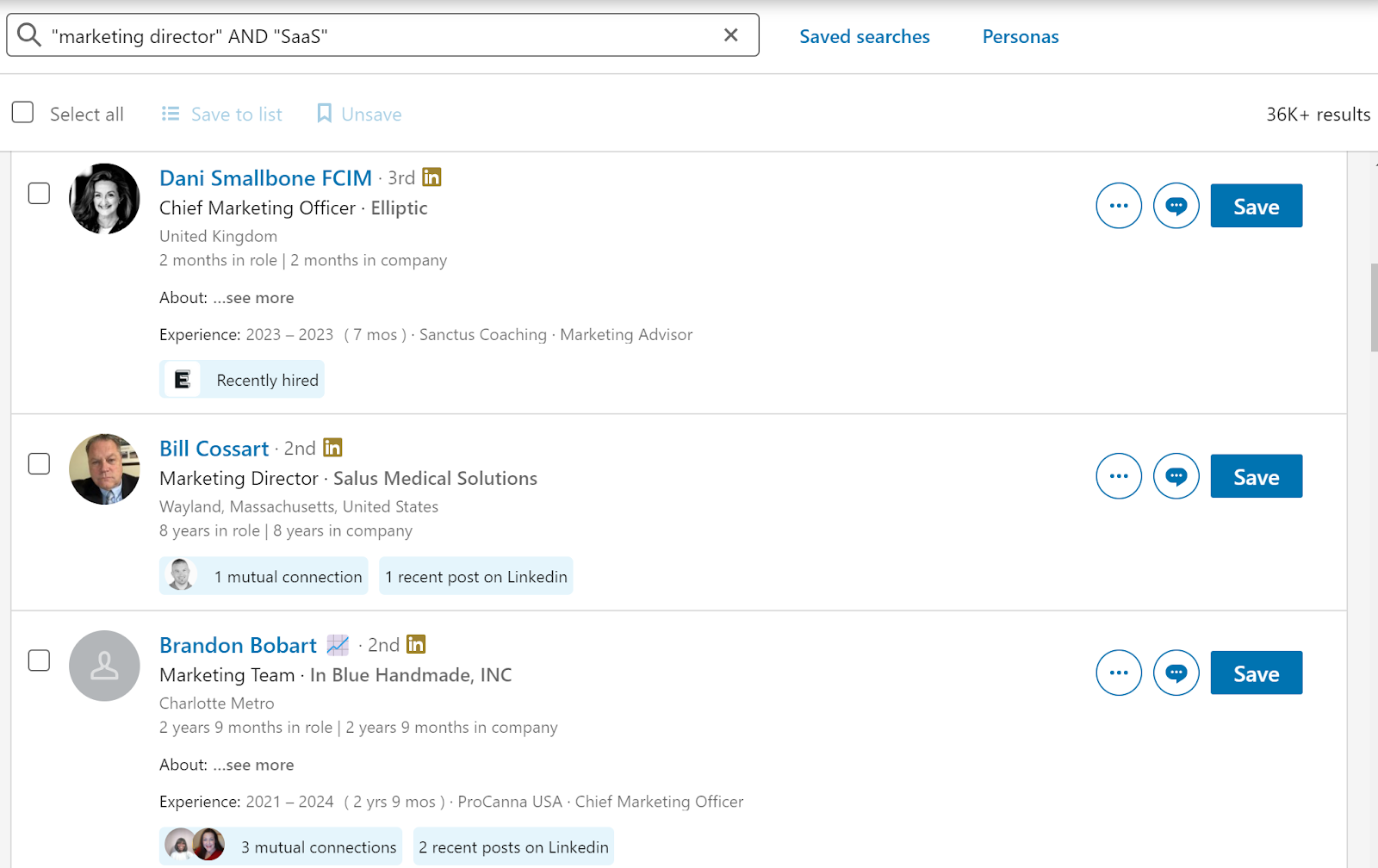
One interesting way we use AND is by adding "LinkedIn articles."
For example, a search for “Marketing Manager” AND “LinkedIn articles” will show the results of marketing managers who have recently shared a LinkedIn article.
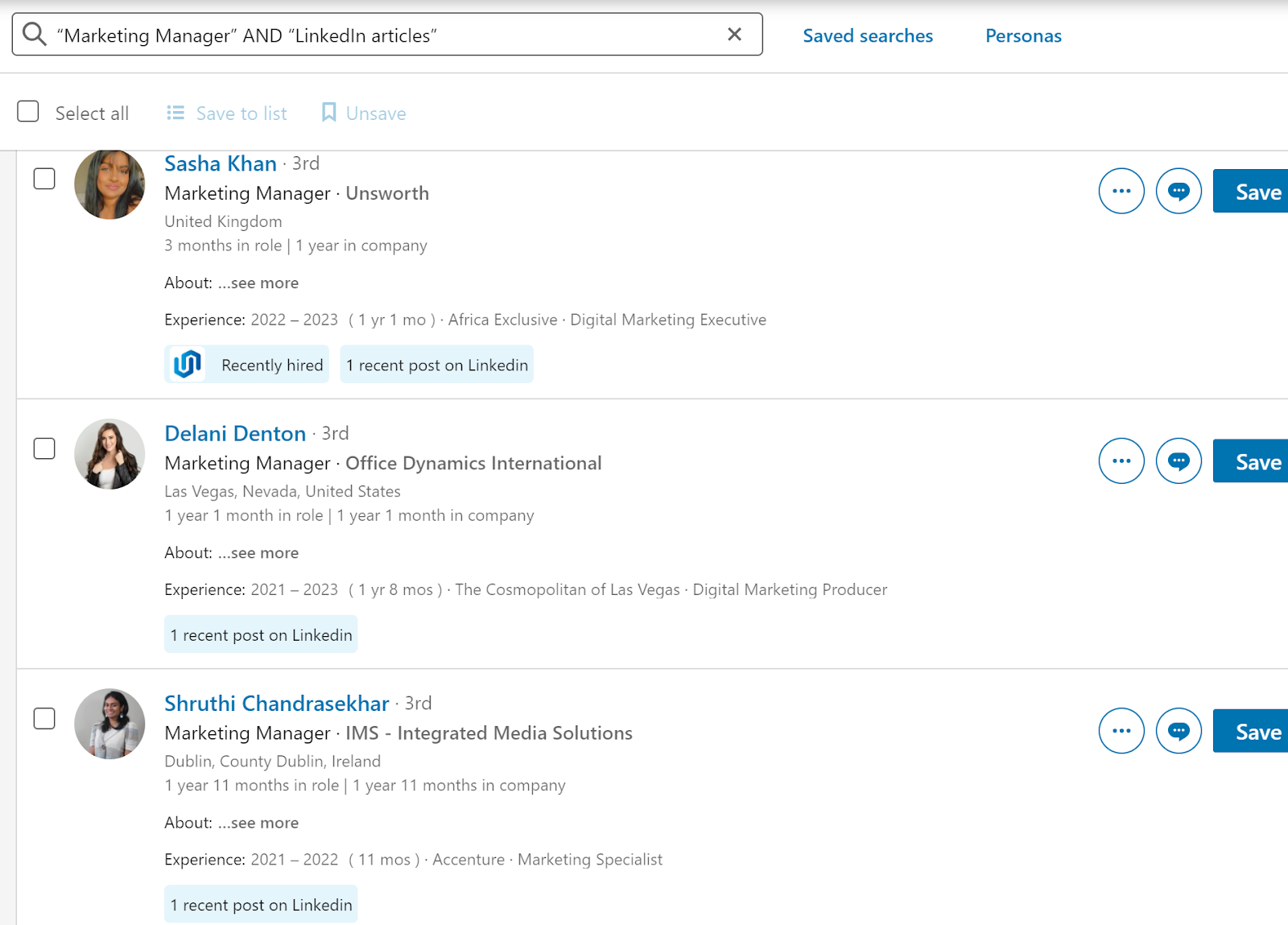
It’s a smart way to trim down your search to active professionals.
OR
OR helps you broaden your search by finding profiles containing any of the listed keywords.
Let’s say you search for "marketing manager" OR "content marketing” OR “SEO lead”—LinkedIn will find profiles with either "marketing manager" or "content marketing," or “SEO Lead” on their profiles.

This is useful when you need to search for synonyms or related descriptors. For example, if your ICP are C-suite executives, your search could be something like CEO OR CTO OR CFO.
NOT
Earlier we mentioned excluding red flag keywords from your results. NOT is the operator that makes this possible. Any keywords you place after a NOT will be excluded from your search results, making them much more targeted.
For example, a search for "sales manager" NOT "entry-level" will find profiles with "sales manager" but eliminate those with "entry-level" to focus on more experienced candidates.

Here's the best way to use this operator. First, search your keyword without NOT. Then, skim through the top hits and spot any off-target results. Do a quick scan of their profiles to identify common keywords and use these as NOT words in your search.
Parentheses ( )
Parentheses become important when combining different keywords and operators to create more complex search strings. It helps LinkedIn’s algorithm understand how it should go about parsing through the search string.
This is a tiny bit technical, but bear with us. First, it’s important to understand that LinkedIn follows a hierarchy when processing Boolean search elements:
- Quotes
- Parentheses
- NOT
- AND
- OR
For example, let’s say you search for something like this (without parentheses):
- Marketing OR Sales AND Manager OR Director
It means LinkedIn will first treat Sales AND Manager as a priority. In other words, the search string could be understood as:
- Profiles that mention both "Sales" and "Manager."
- Profiles that mention "Marketing."
- Profiles that mention "Director."
…which might not be what you intended.
Now, let's use parentheses to clarify the search:
- (Marketing OR Sales) AND (Manager OR Director)
Since LinkedIn places parentheses above AND and OR, it handles what’s inside first. So, the search string now means:
- Profiles that mention either "Marketing" or "Sales."
- Among those profiles, including those that mention either "Manager" or "Director".
Advanced Boolean Search Example (+ Breakdown)
There you have it—all the operators you need to quickly zero in on B2B prospects. Now, you just need to put them all together. To help with that, we thought it would be helpful to share an example of an advanced LinkedIn Boolean search along with a breakdown of what exactly it’s doing.
Here’s the search:
- ("software engineer" OR developer) AND (Python OR Java) NOT (junior OR intern) "machine learning"
…and here’s the breakdown of the operation:
- Process quoted phrases:some text
- "software engineer"
- "machine learning"
- Evaluate expressions within parentheses:some text
- ("software engineer" OR developer)
- (Python OR Java)
- (junior OR intern)
- Apply NOT operator:some text
- Exclude results containing (junior OR intern)
- Apply AND operators:some text
- Combine results from steps 2 and 3 with "machine learning"
- Produce final results—profiles that are:some text
- "software engineer" or developer
- AND mention Python or Java
- AND mention "machine learning"
- But NOT junior or intern
Create Complex Boolean Expressions with ChatGPT
Still a bit confused? You’ll get the hang of it. And in meantime, you can use ChatGPT to generate pretty reliable LinkedIn Boolean searches conversationally.
Here’s an example prompt:
- I'm looking to find B2B leads in the healthcare technology sector who are decision-makers in purchasing or procurement roles, specifically excluding consultants and contractors. Help me create a Boolean expression for this.
We think it does a pretty good job here:
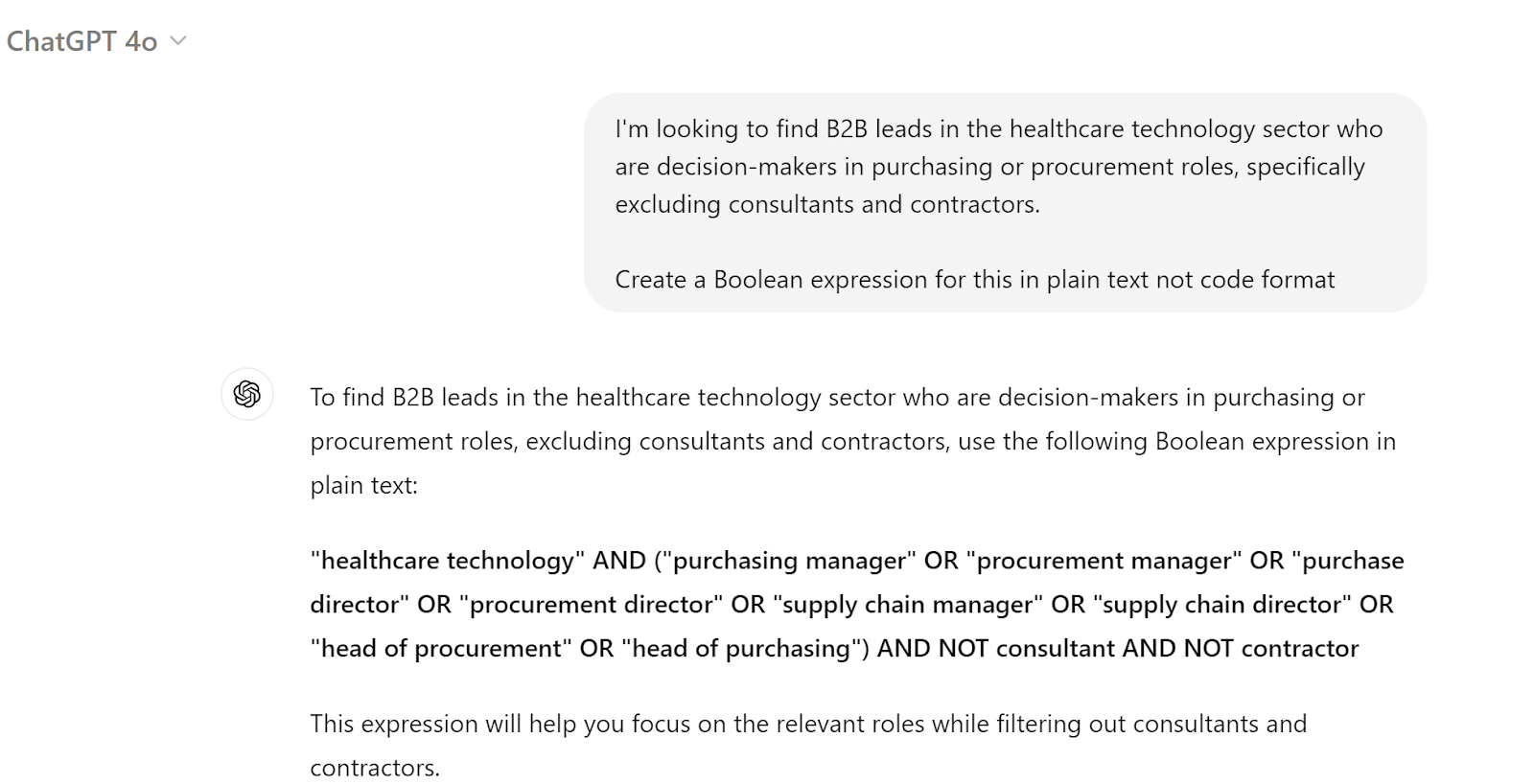
Just remember to double-check your work, whether you’re writing Boolean expressions manually or with AI. LinkedIn won’t flag errors—it’ll show results either way, and they might not hit the mark.
Let Uptown Creation Find High-Quality B2B Leads on LinkedIn
Boolean search is an incredible technique that lets you laser-focus your search for leads on LinkedIn, but it can get complicated at times. Plus, finding leads is just one small piece of the LinkedIn lead generation puzzle.
Looking for support? Why not let Uptown Creation handle your lead generation?
Our hands-on, hyper-targeted approach to manual outreach has led to some pretty spectacular results for clients like Making Science (6X'ed their investment in under 6 months) and Atrix AI (booked 26 calls in the first 90 days).
Book a strategy call and we’ll analyze your LinkedIn presence to create a custom lead generation plan for you. It’s completely free, and there’s no pressure to commit.