Article

LinkedIn-Led Outbound: How to Use LinkedIn to Power Outbound Sales

Uptown Creation Team
September 2, 2024

LinkedIn-Led Outbound: How We Use LinkedIn to Power Outbound Sales

LinkedIn-led outbound is a great way to close more sales quickly. It helps mitigate three of the top five challenges sales teams face:

  1. Standing out from the competition
  2. Lack of high-quality leads
  3. Reaching decision-makers

Our point? LinkedIn is where you want to be when targeting the top prospects. This Uptown Creation guide will help you turn LinkedIn into a top revenue driver for your business and a key asset for boosting your outbound sales efforts.

How to Use LinkedIn for Outbound Sales

Now that we’ve covered why you need to use LinkedIn for sales outreach, let us help you do it effectively to secure more customers, faster.

1. Optimize Your Profile

The aesthetics and content of your LinkedIn profile are some of the key factors in determining whether people will accept your connection requests. So, you need to make sure your profile is visually appealing, skimmable, and compelling.

Some tips to note about creating an optimized LinkedIn profile:

  • Headlines: This profile section carries a lot of weight so you don’t want it to say something spammy.  Also, avoid using headlines like “I help people do XYZ”. Instead, follow this structure—your current job title @ (the company you work for), one or two things professionally about you or how you identify yourself, and one personal trait or passion.
  • Profile Picture: Your profile picture should be a headshot (ideally from your shoulders and above). Zoom in the picture as much as possible without being creepy, and ensure the background is as plain as possible. Your face is the highlight.
  • Name: This tip may seem obvious, but your name will be the most memorable part of your personal brand, so make sure you use the exact combination you want to be known for. You can also add an audio pronunciation to your profile to engage visitors and teach them to call the name right.
  • Featured section: This is one of the first things your profile visitors will see so it’s key to driving traffic elsewhere. You can easily pin LinkedIn posts, newsletters, articles, photos, videos, or websites here.

Get more LinkedIn profile optimization tips.

2. Use LinkedIn Sales Navigator 

Another tool in your arsenal is the LinkedIn Sales Navigator. To access LinkedIn Sales Navigator, you need a premium LinkedIn account.

Once you access the platform:

a. Create lead lists

These lead lists will serve as your outreach sales pipeline, helping you track:

  • Who you sent connection requests
  • Who accepted them
  • Who you’ve sent a message
  • Who has responded
  • The sentiment of those responses
  • Who has booked a meeting
  • Who you’ve closed a deal with

b. Create a saved search.

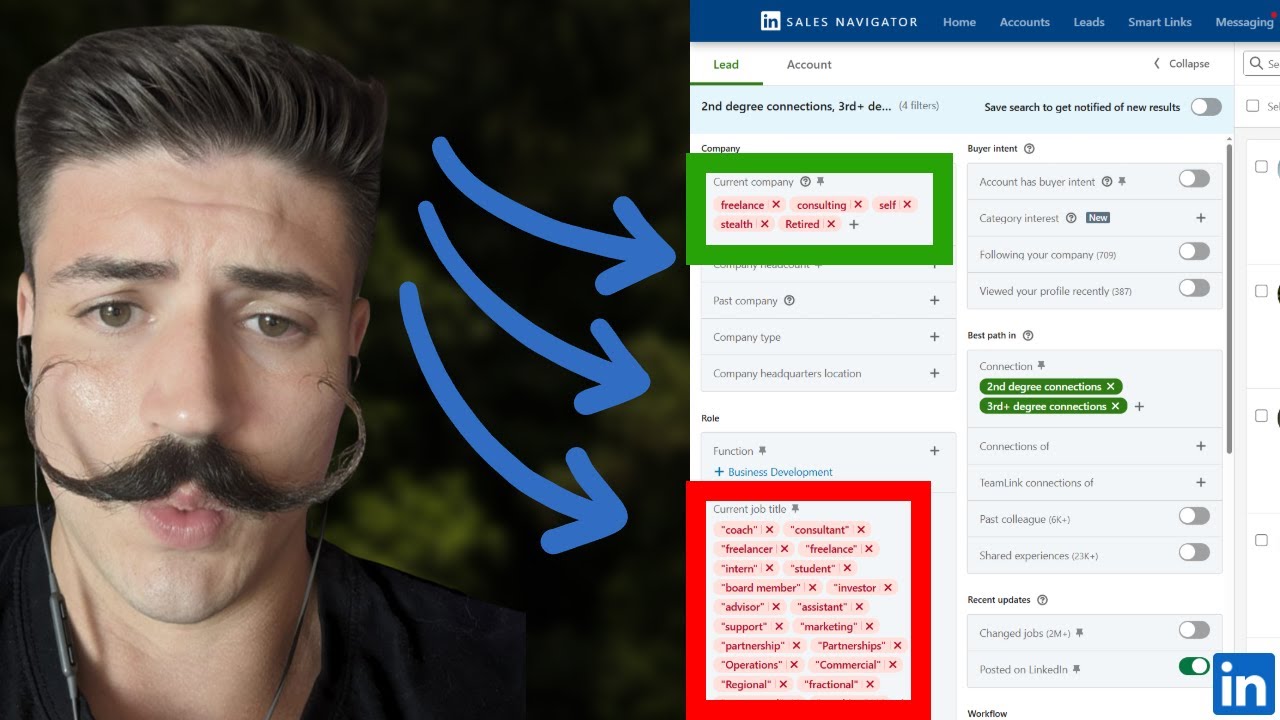
Do this by clicking “lead filters” and building different targeting lists for all your ICPs. 

First, focus on 2nd and 3rd-degree connections. Next, input your geography/location and exclude all your saved leads and anyone you’ve sent a message to. So this list is only made up of net new opportunities.

Some key filters that help you reach prospects who are active LinkedIn users likely to be responsive:

  • Posted on LinkedIn in the last three months
  • Current job title (to include and exclude)
  • Company headcount
  • Industry

3. Make Strategic Connections

LinkedIn only lets you send 800 connection requests a month, so you have to work with that for now. Once you’ve optimized your profile, send 200 connection requests weekly. 

Don’t just spray and pray, though. Here are some best practices to help you connect with the most relevant users and maximize your response rate:

  • Select everyone from your saved searches and add them to the connection request lead list you made earlier.
  • Send blank connection requests to each prospect on the list (these tend to get accepted more than requests with personal messages or notes).

4. Send Messages to Your New Connections

Once you make some new connections, create a new saved search with only 1st-degree connections. Filter it by the lead lists of users you’ve sent connection requests to, and move it to the lead list of users who’ve responded to them (remember, you created these lead lists in step 2).

These actions ensure that prospects get automatically added to this saved search immediately after they accept your connection requests. 

Also, remember to exclude users you’ve sent messages to so they’re removed from the list as soon as you do. With this list, you can easily see and reach out to prospects you haven’t messaged yet.

5. Leverage Message Templates

To help you get started, here’s the post-connection follow-up message that helped us see a 30% higher response rate on LinkedIn:

“I know this is random [Name], but you seemed like the best person to reach out to about this.

I'm chatting with some [Title]s who know [they should be doing X thing to solve Y problem].

At a high level we help [value proposition in half a sentence].

Would it be alright if I shared a few ideas for how you can [achieve Z result]?”

Why does this template work so well? It focuses more on the PROBLEM you can help prospects solve rather than the solution you are selling to solve that problem. You can also check out these LinkedIn message templates for sales pros and teams for more inspiration.

We’ve seen better results using permission-based CTAs instead of just adding meeting booking links in the first message. You likely will too. 

After sending these messages, move your prospects to the “message sent” lead list you created earlier in step 2. And, of course, once users respond to your message (positive, negative, or neutral) or take the next step, move them to your “responded,” “meeting booked,” or “deal closed” lead list as applicable.

Conclusion

So there you have it—a LinkedIn-led outbound blueprint, from profile optimization to lead lists, saved searches, and message templates. 

Need a professional to help you with the heavy lifting? Look no further than Uptown Creation. We provide end-to-end LinkedIn outreach resources, training, and consultancy. We also offer a 90-day, done-for-you LinkedIn lead generation plan, active targeting, and engagement nurturing.

Book a free strategy call to get started.
Related posts

Keep going. More from the Uptown team on LinkedIn.

Strategy
linkedin-outbound-sales-strategy
Video
Strategy
June 8, 2026
how-to-use-linkedin-to-actually-generate-revenue-in-2026
▶
Video
Strategy

How to Use LinkedIn To ACTUALLY Generate Revenue in 2026

June 8, 2026
Video
Strategy
May 26, 2026
linkedins-hard-until-businesses-do-this
▶
Video
Strategy

LinkedIn's Hard, Until Businesses Do This

May 26, 2026
Video
Strategy
May 4, 2026
the-new-linkedin-lead-gen-strategy-dominating-in-2026
▶
Video
Strategy

The NEW LinkedIn Lead Gen Strategy Dominating in 2026

May 4, 2026
Video
Targeting
April 30, 2026
this-new-linkedin-sales-navigator-filter-is-insane
▶
Video
Targeting

This NEW LinkedIn Sales Navigator filter is insane

April 30, 2026
Video
Strategy
April 20, 2026
copy-this-linkedin-strategy-itll-blow-up-your-business
▶
Video
Strategy

Copy This LinkedIn Strategy, It'll Blow Up Your Business

April 20, 2026
Video
Messaging
April 5, 2026
i-sent-10-000-000-linkedin-dms-and-learned-this
▶
Video
Messaging

I sent 10,000,000 linkedin dms and learned this

April 5, 2026
Video
Messaging
October 2, 2025
linkedin-has-the-best-cold-calling-data-on-the-internet
▶
Video
Messaging

LinkedIn has the Best Cold Calling Data on the Internet

October 2, 2025
Video
Strategy
August 27, 2025
paypal-pays-240k-for-this-linkedin-secret-you-can-do-yourself
▶
Video
Strategy

PayPal Pays $240K for This LinkedIn Secret You Can Do Yourself

August 27, 2025
Video
Targeting
August 25, 2025
how-to-make-linkedin-lead-lists-that-actually-work-in-sales-navigator
▶
Video
Targeting

How To Make LinkedIn Lead Lists That Actually Work in Sales Navigator

August 25, 2025
Video
Targeting
August 15, 2025
how-i-use-linkedin-sales-navigator-to-close-deals-every-week
▶
Video
Targeting

How I Use LinkedIn Sales Navigator to Close Deals Every Week

August 15, 2025
Video
Profile
July 30, 2025
optimize-your-linkedin-profile-for-revenue-generation
▶
Video
Profile

Optimize Your LinkedIn Profile for Revenue Generation

July 30, 2025
Video
Content
February 4, 2025
the-1-000-000-linkedin-content-playbook-used-by-the-top-1-of-b2b-sellers
▶
Video
Content

The $1,000,000 LinkedIn Content Playbook Used by the Top 1% of B2B Sellers

February 4, 2025
Video
Strategy
January 21, 2025
how-to-use-linkedin-in-2025-to-generate-revenue
▶
Video
Strategy

How to Use LinkedIn in 2025 to Generate Revenue

January 21, 2025
Video
Messaging
December 4, 2024
linkedin-profile-optimization-guide-how-to-optimize-your-linkedin-profile-for-ou
▶
Video
Messaging

LinkedIn Profile Optimization Guide | How to Optimize Your LinkedIn Profile for Outreach

December 4, 2024
Video
Strategy
December 2, 2024
linkedin-made-simple-revenue-funnel-proven-strategies-for-b2b-success
▶
Video
Strategy

LinkedIn Made Simple Revenue Funnel - Proven Strategies for B2B Success

December 2, 2024
Video
Targeting
August 12, 2024
how-to-keep-track-of-new-leads-on-linkedin-linkedin-data-tracking-tutorial-bench
▶
Video
Targeting

How to Keep Track of New Leads on LinkedIn | LinkedIn Data Tracking Tutorial & Benchmarks

August 12, 2024
Video
Messaging
August 6, 2024
this-linkedin-message-gets-30-response-rates-prints-money
▶
Video
Messaging

This LinkedIn Message Gets 30% Response Rates & Prints Money

August 6, 2024
Video
Tools & Reviews
July 29, 2024
linkedin-premium-company-page-overview
▶
Video
Tools & Reviews

LinkedIn Premium Company Page Overview

July 29, 2024
Video
Tools & Reviews
April 16, 2024
how-to-use-apollo-linkedin-to-book-15-meetings-per-month-apollo-linkedin-tutoria
▶
Video
Tools & Reviews

How to Use Apollo & LinkedIn to Book 15+ Meetings Per Month | Apollo + LinkedIn Tutorial & Setup

April 16, 2024
Video
Content
January 11, 2024
become-a-linkedin-top-voice-in-less-than-30-minutes-linkedin-collaborative-artic
▶
Video
Content

Become a LinkedIn Top Voice in Less Than 30 Minutes | LinkedIn Collaborative Articles Guide

January 11, 2024
Video
Strategy
January 5, 2024
linkedin-2024-sales-tutorial-complete-how-to-setup-guide-of-best-linkedin-lead-g
▶
Video
Strategy

LinkedIn 2024 Sales Tutorial | Complete How to Setup Guide of Best LinkedIn Lead Generation

January 5, 2024
Video
Content
January 20, 2023
insane-commenting-strategy-with-chatgpt-on-linkedin-saves-you-hours
▶
Video
Content

INSANE Commenting Strategy with ChatGPT on Linkedin Saves You Hours

January 20, 2023
Video
Content
January 17, 2023
schedule-linkedin-posts-easily-how-to-structure-linkedin-posts-for-more-engageme
▶
Video
Content

Schedule LinkedIn Posts Easily - How To Structure LinkedIn Posts For More Engagement

January 17, 2023
Video
Strategy
January 9, 2023
linkedin-lead-generation-tutorial-2023-how-to-build-a-predictable-sales-pipeline-on-linkedin
▶
Video
Strategy

LinkedIn Lead Generation Tutorial 2023 - How To Build A Predictable Sales Pipeline On LinkedIn

January 9, 2023
Video
Targeting
December 13, 2022
simple-linkedin-setup-how-to-stay-organized-on-linkedin-sales-navigator
▶
Video
Targeting

Simple LinkedIn Setup - How To Stay Organized on LinkedIn Sales Navigator

December 13, 2022
Video
Strategy
October 24, 2022
grow-your-linkedin-connections-fast-to-500
▶
Video
Strategy

Grow Your LinkedIn Connections FAST To 500+

October 24, 2022
Video
Targeting
October 7, 2022
how-to-search-for-specific-companies-on-linkedin
▶
Video
Targeting

How To Search For Specific Companies On LinkedIn

October 7, 2022
Video
Strategy
October 3, 2022
linkedin-algorithm-explained-by-linkedin-employee
▶
Video
Strategy

LinkedIn Algorithm Explained By LinkedIn Employee

October 3, 2022
Video
Strategy
June 24, 2022
linkedin-live-event-setup-tutorial-best-practices-guide
▶
Video
Strategy

LinkedIn Live Event Setup Tutorial & Best Practices Guide

June 24, 2022
Video
Messaging
February 24, 2021
send-messages-to-anyone-on-linkedin-without-restriction-open-profiles-inmails-groups-and-events
▶
Video
Messaging

Send Messages To Anyone On LinkedIn Without Restriction - Open Profiles, InMails, Groups and Events

February 24, 2021
Video
Strategy
February 10, 2021
how-to-withdraw-pending-connection-requests-on-linkedin-fast
▶
Video
Strategy

How To Withdraw Pending Connection Requests On LinkedIn FAST

February 10, 2021